Roles and permissions
1 min read
Summary
Owner, Manager and Receptionist: what each role can see and change.
The three roles
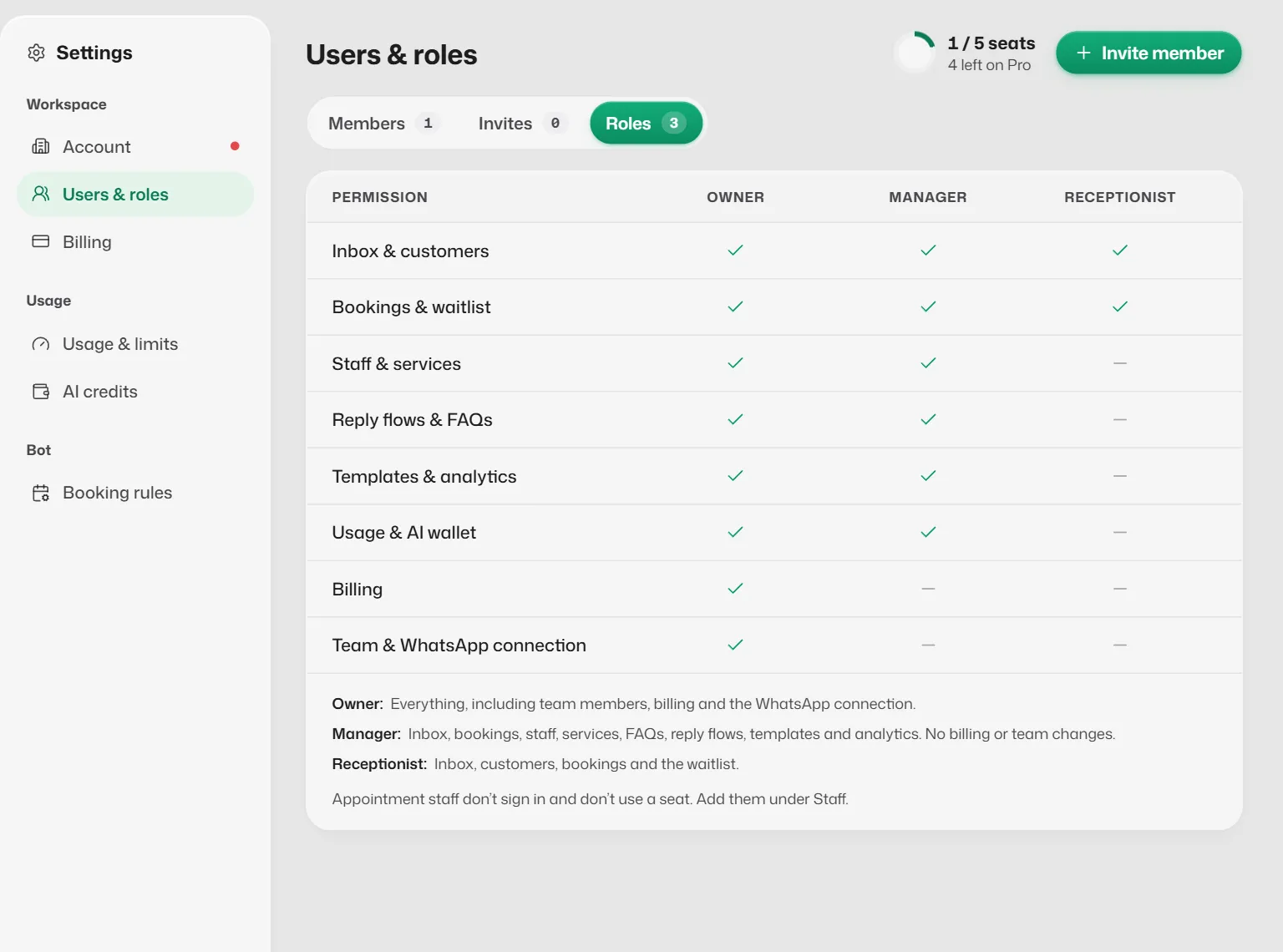
- Owner: everything, including team members, billing and the WhatsApp connection. The person who created the account is always the owner.
- Manager: inbox, bookings, staff, services, FAQs, reply flows, templates and analytics. No billing or team changes.
- Receptionist: inbox, customers, bookings and the waitlist.
Screens by role
- Everyone: Home, Conversations, Bookings and Settings → Account.
- Managers and owners also: Analytics, Business info, Reply flows, Message templates, the Staff tab in Bookings, and Settings → Usage & limits, AI credits and Booking rules.
- Owner only: Connect WhatsApp, Plans, and Settings → Users & roles and Billing.
- Only managers and owners can switch auto-replies on or off for the whole business.
The full list is under Settings → Users & roles → Roles.
If something goes wrong
- A screen says Not part of your role.
- Your role does not include that screen. Ask the owner to change your role if you need it.
- "Your role does not include this. Ask a manager or the owner."
- The action needs a higher role. A manager or the owner can do it for you.
Related articles
Still need help?
Search the FAQs or contact our team by email or phone.