Submit the booking templates
Summary
Get the confirmation, reminder, moved, cancelled and team alert templates approved so those messages always arrive.
Before you start
- Your WhatsApp number is connected.
Submit from the library
- 1
Open Message templates → Library.
- 2
Under Booking messages, find Booking confirmation, Booking moved, Booking cancelled and Team alert. Select Review and submit.
- 3
Choose what to submit, review the wording, then select Submit for approval.
- 4
Read the results: Sent to Meta for review, Already on your account, Not submitted or Meta refused it.
Nothing is submitted for you automatically. Booking messages can be submitted on every plan. Booking reminder and Waitlist offer need Growth or Pro.
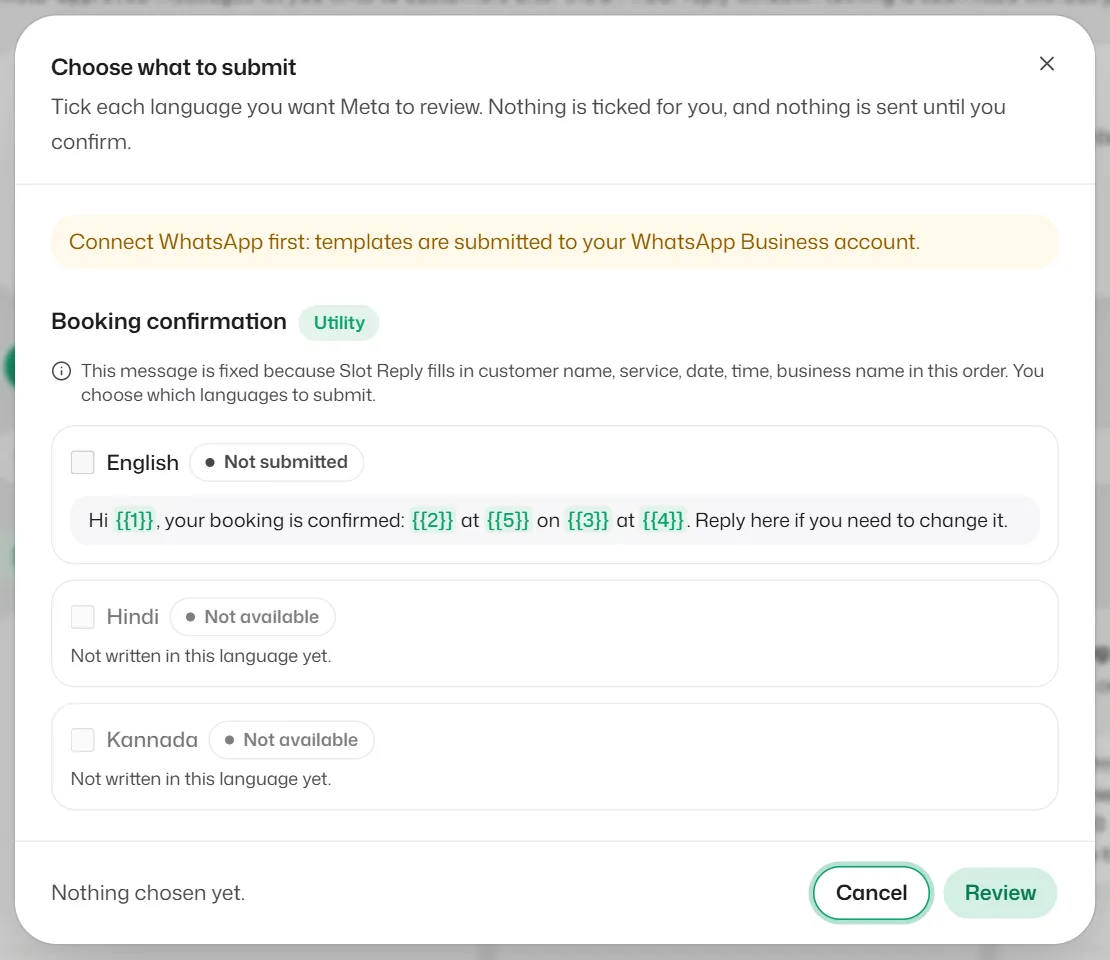
What you should see
- Once Meta approves them, the templates show Approved, and booking messages reach customers even outside the 24-hour window.
Related articles
What message templates are
Messages approved by WhatsApp in advance, needed for anything you send more than 24 hours after a customer's last message.
Appointment reminders
Send customers WhatsApp reminders before their appointment, and let them confirm with one tap.
Get alerted when a customer needs you
When the bot hands a chat to your team, get a WhatsApp alert on your own phone, a pop-up and a sound.
Still need help?
Search the FAQs or contact our team by email or phone.