Take over a chat and give it back to the bot
Summary
Pause the assistant for one chat while you handle it, then hand it back when you are done.
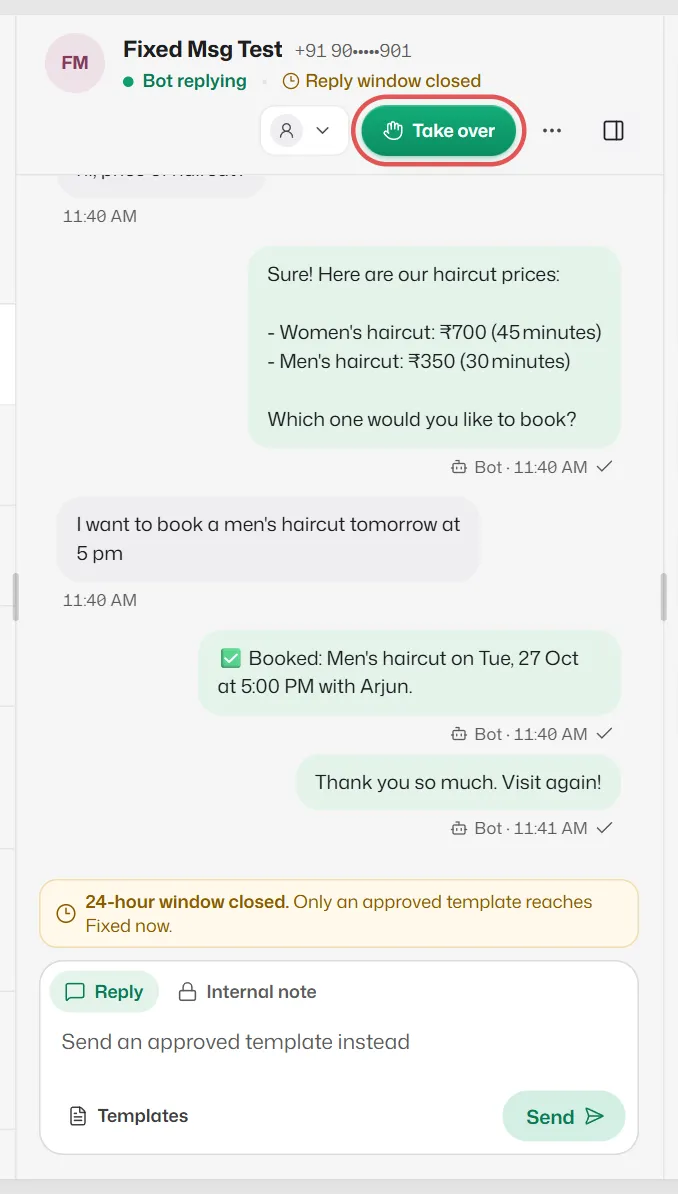
Take over
- 1
Open the chat and select Take over, or simply send a message.
- 2
The bot stays quiet in this chat while you reply. Other chats are not affected.
Give it back
- 1
Select Give back to bot (or Back to bot while the chat is waiting for a person).
- 2
Confirm. If the customer's last message is unanswered, the bot answers their next one.
To hand back many chats at once, select them and use Back to bot in the selection bar.
Give chats back automatically
- 1
Open Business info → Personality & handoff → Handover to you.
- 2
Under If nobody picks the chat up, choose Give it back to the bot after a number of hours, or Keep it with the team.
Related articles
Get alerted when a customer needs you
When the bot hands a chat to your team, get a WhatsApp alert on your own phone, a pop-up and a sound.
Find your way around the inbox
Filter chats, see who is answering each one, and find a customer by name or number.
Turn auto-replies on or off
Pause the assistant for the whole business, for example during a team meeting, and switch it back on.
Still need help?
Search the FAQs or contact our team by email or phone.