Record a customer's marketing consent
Summary
Keep a record that a customer agreed to get offers and promotions, and withdraw it if they change their mind.
Record consent
- 1
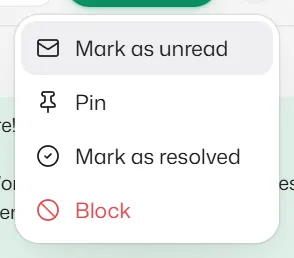
Open the chat, select ⋯ and choose Marketing consent.
- 2
Choose where they agreed: in person, by phone, on a paper form, on a website form, or other. Add a note if it helps.
- 3
Select Record marketing consent. Nothing is sent to the customer.
Record only consent the customer really gave you. You can't record it while they are opted out: they need to send START first.
Withdraw consent
- 1
Select ⋯, then Marketing consent, then Withdraw marketing consent.
Consent is also withdrawn by itself when the customer sends STOP, turns off your messages in WhatsApp, or your team marks them as opted out. Sending START later does not bring it back; record it again only if they agree again.
What consent changes
- A Marketing template (offers, promotions) is sent only while the customer's consent is recorded. Utility templates, such as booking confirmations and reminders, are not affected.
- Without consent, Send template in the inbox says so and does not send. A reply flow's template step sends nothing and the chat comes to your team. A reminder with a Marketing template is not sent and shows why. The no-show invitation shows Not invited on the booking, with the reason.
- Customers you were already messaging have no recorded consent yet. Record it for those who agreed to hear about offers.
What Slot Reply records by itself
- When a customer first writes to you, Slot Reply notes that they contacted you.
- Every STOP and START, every change they make in WhatsApp, and every opt-out your team marks or removes is kept too.
- Records are never changed or deleted, and they are part of your account export.
Related articles
Mark a customer as opted out
Stop automatic messages to a customer who asked you by phone or in person, and undo it if needed.
When a customer replies STOP
Customers can stop automatic messages by replying STOP and turn them back on with START.
Send a template from a chat
Reach a customer after the 24-hour window has closed with an approved WhatsApp template.
Still need help?
Search the FAQs or contact our team by email or phone.