Build a flow and make it live
Summary
A worked example: a welcome menu with three buttons, built from scratch, tested and made live.
Start the flow
- 1
Open Reply flows and select Blank flow. (To start from a ready-made flow instead, see The ready-made flows.)
- 2
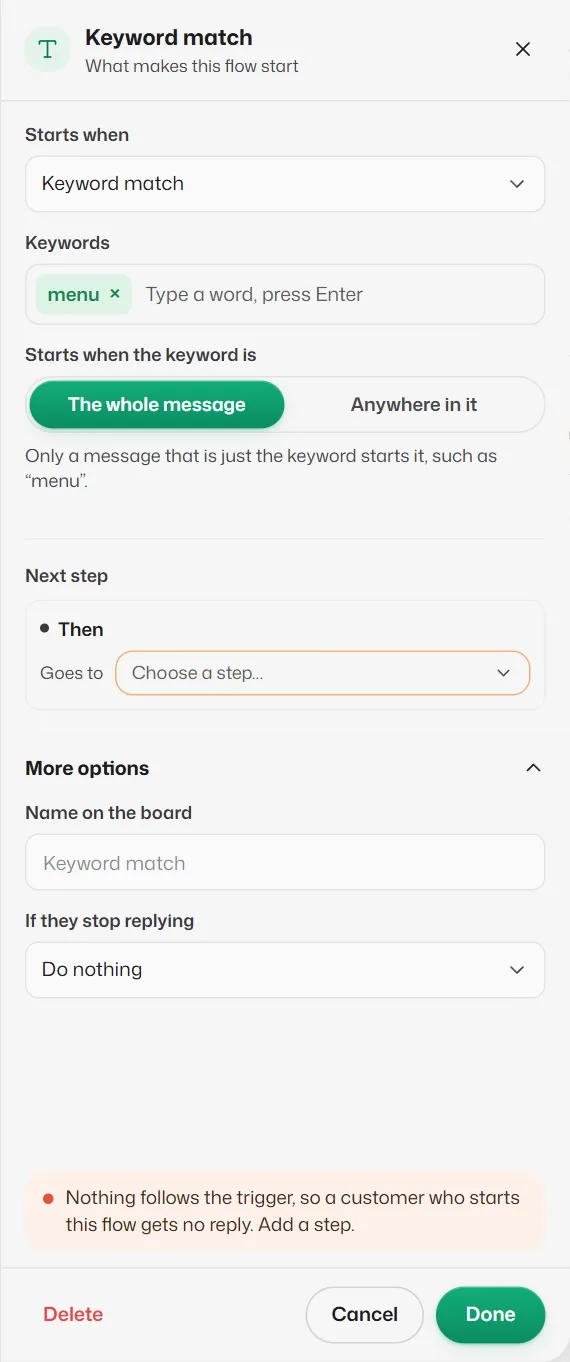
Click the trigger card (on an empty board, select Add a trigger first). In Keywords, type menu and press Enter. Leave Starts when the keyword is on The whole message.
Avoid words Slot Reply already answers itself, such as book, cancel or appointment, and greetings like hi. See Triggers.
Test and go live
- 1
Select Try it, type menu and tap each button. See Test a flow with Try it.
- 2
Turn on Live and confirm Go live.
- 3
After later edits, select Publish changes so customers get the new version.
What you should see
- The flow shows as Live in Your flows, and a customer who sends "menu" gets the three buttons.
If something goes wrong
- "Your plan allows N live flows."
- Pause another flow, or upgrade in Settings → Billing.
- "Slot Reply answers “book” itself. Use another word, such as “menu”."
- Booking, cancelling and moving are handled without a flow, so those words cannot start one. Choose another keyword.
- A ready-made flow shows a plan name instead of Use template.
- It uses a step your plan does not include, such as a WhatsApp template or a scheduled start.
Related articles
Find your way around the flow builder
The toolbar, the Add a step panel, the board and the settings panel, and how drafts, publishing and checks work.
The Buttons step
Sends a message with up to 3 tap-able buttons. Each button leads to its own next step.
Test a flow with Try it
Chat with your draft as if you were a customer, without booking anything or sending any message.
Still need help?
Search the FAQs or contact our team by email or phone.