The AI answer step
1 min readManagers and owners
Summary
Lets the AI answer the customer from your business info, and hands over when it cannot.
Settings
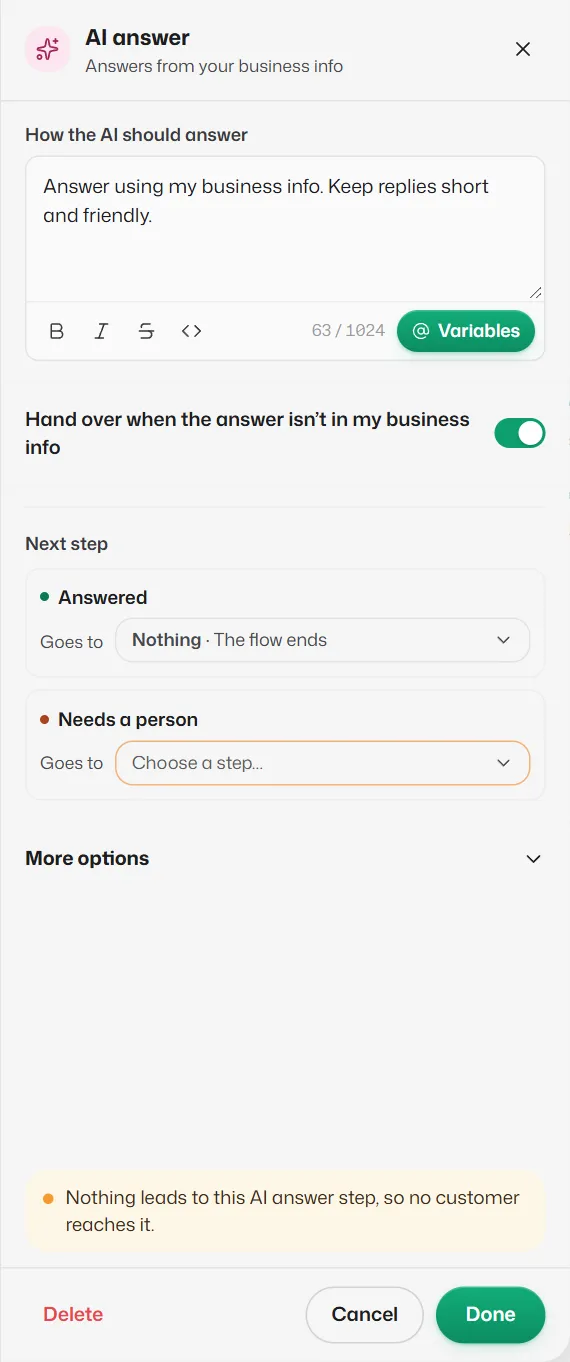
- How the AI should answer: instructions for this step, such as "Answer questions about prices only. Keep it short." It starts as "Answer using my business info. Keep replies short and friendly." The AI still only uses what is in Business info.
- Hand over when the answer isn’t in my business info: on, the step has a second way out, Needs a person, used when the AI is unsure or the customer asks for a person.
- Answered: optional. With Nothing, the AI keeps answering whatever the customer says next.
- Needs a person: required while the switch is on. Usually a Hand over to team step.
Good to know
- AI answers use AI credits, like any AI reply. See How AI credits work.
- If When nothing else answers is not set to AI, this step always goes down Needs a person, and the builder shows The AI isn’t answering.
- In Try it, AI answers are real but free, up to 5 a day.
Related articles
How automatic replies work
What the assistant answers, in which order it tries things, and when it passes a chat to your team.
The Hand over to team and End flow steps
Two ways to finish a flow: pass the chat to a person, or stop and let the assistant carry on.
Test a flow with Try it
Chat with your draft as if you were a customer, without booking anything or sending any message.
Still need help?
Search the FAQs or contact our team by email or phone.