The Message step
1 min readManagers and owners
Summary
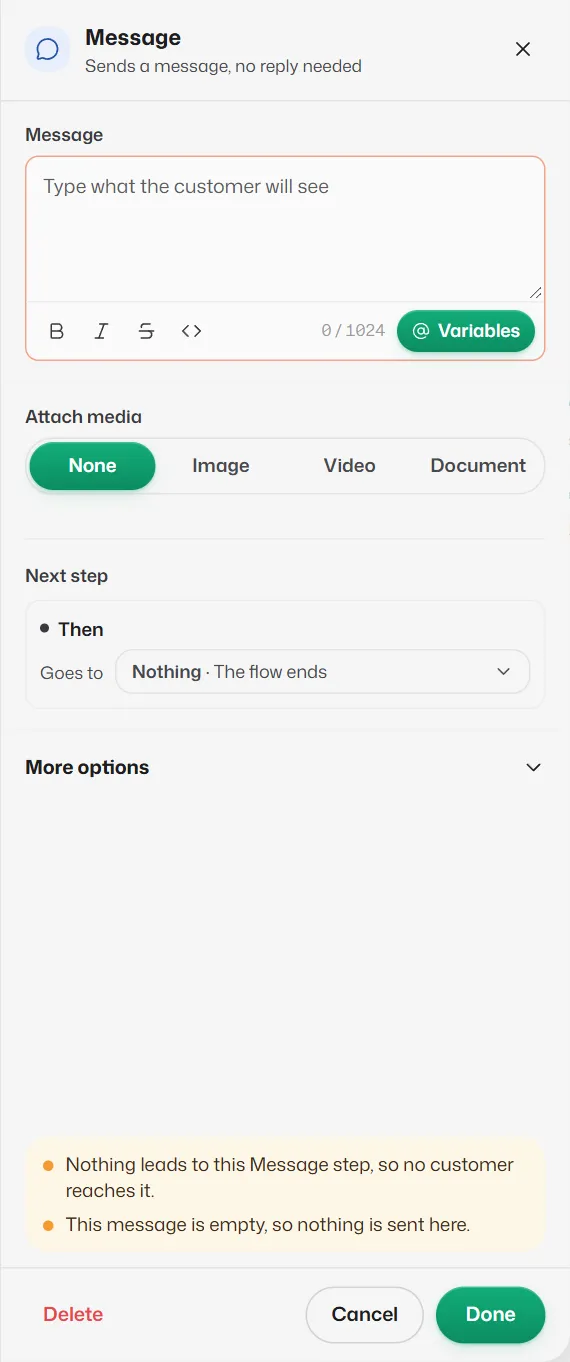
Sends a message, with an optional photo, video or document, and carries straight on. No reply needed.
Settings
- Message: what the customer sees, up to 1,024 characters. The B, I, strikethrough and <> buttons add WhatsApp bold, italic, strikethrough and monospace. Variables inserts @words such as @name; see Saved answers and @variables.
- Attach media: None, Image (JPG or PNG, up to 5 MB), Video (MP4 or 3GP, up to 16 MB) or Document (PDF, Word, Excel or PowerPoint, up to 100 MB). Upload the file or drag it in, or use a link starting with https://. With media, the message text is sent as its caption.
- Next step → Then: optional. With Nothing, the flow ends after this message.
If something goes wrong
- "This message is empty, so nothing is sent here."
- Type the message, or delete the step.
- "Upload the image or paste a link to it, or set Attach media to None."
- You chose a media type but gave no file.
Related articles
Still need help?
Search the FAQs or contact our team by email or phone.