Test a flow with Try it
1 min readManagers and owners
Summary
Chat with your draft as if you were a customer, without booking anything or sending any message.
Test
- 1
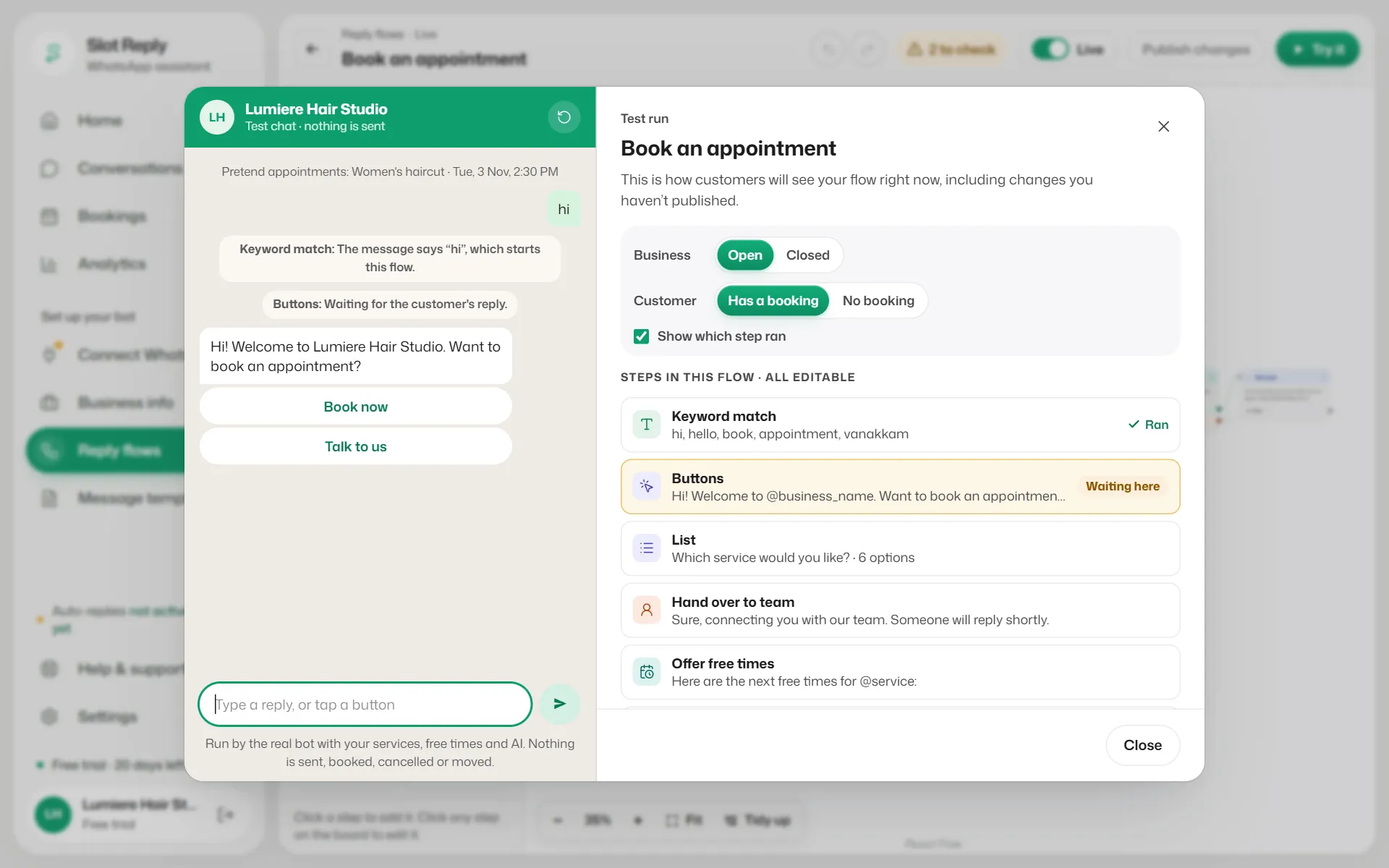
In the builder, select Try it. The flow starts with its first keyword (a scheduled flow starts as if the time had come).
- 2
Set up the pretend customer: Customer is Has a booking or No booking (and Two when the flow checks bookings). Business is Open or Closed when the flow uses your hours.
- 3
Type replies or tap the buttons, as a customer would. Tick Show which step ran to follow along in the step list on the right.
- 4
Use Start over between tests.
Good to know
- It runs your draft, including changes you have not published.
- It uses your real services and free times, but nothing is sent, booked, cancelled or moved. You see lines like "A real customer would now be booked".
- AI answer steps really answer, without using credits, up to 5 times a day per business.
- Only this flow is tested. Live, your other flows or the AI could answer a message this flow does not.
- Reminder nudges are not sent in a test.
Related articles
Still need help?
Search the FAQs or contact our team by email or phone.